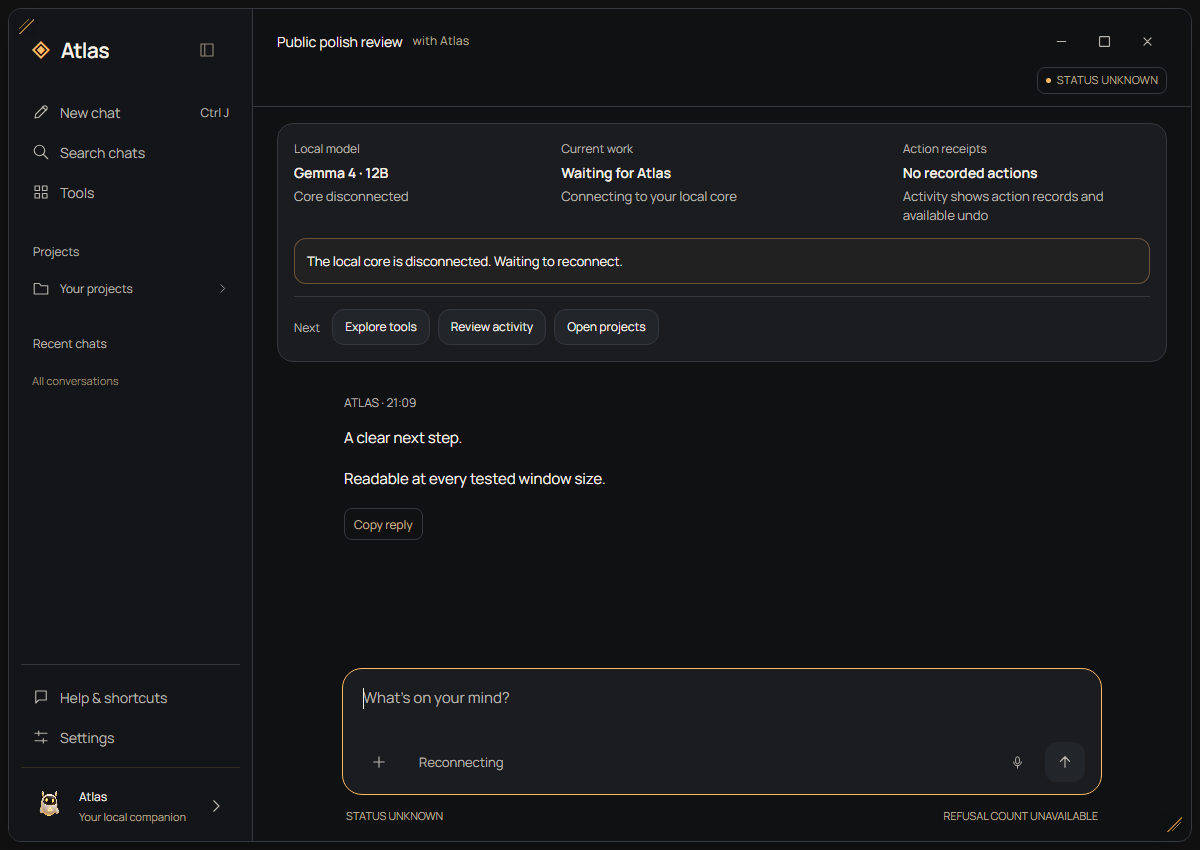
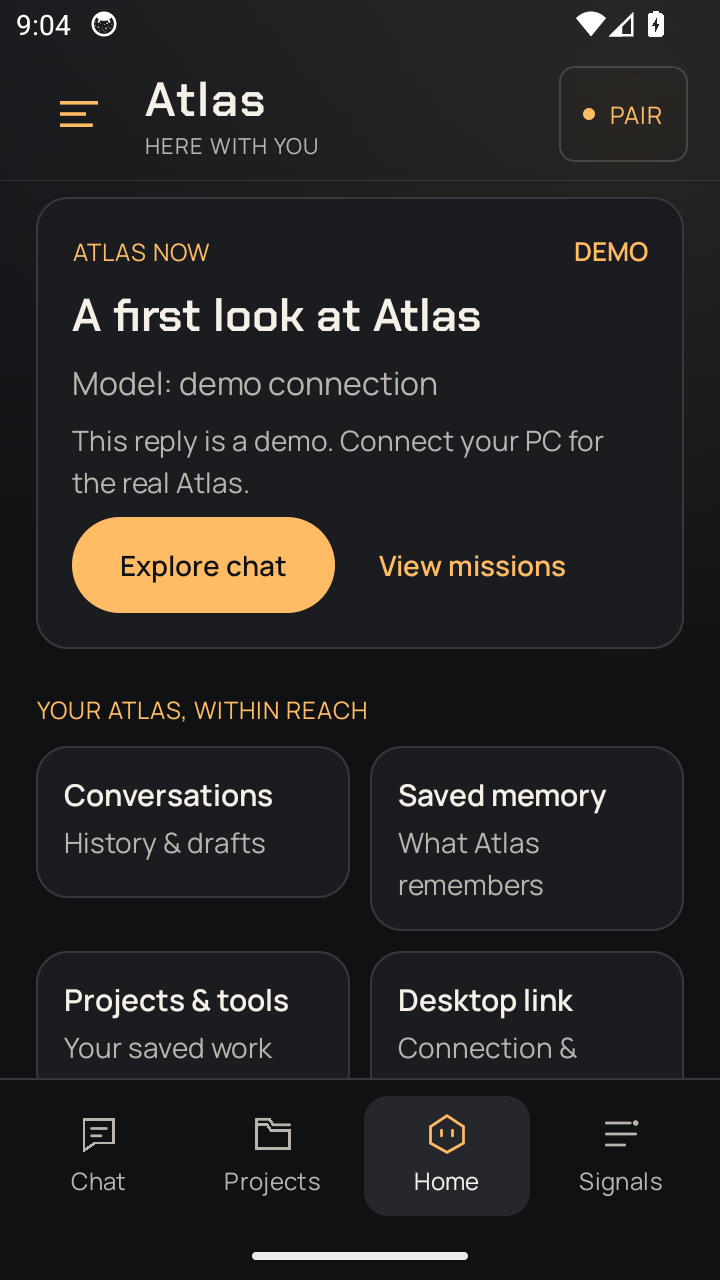
Atlas is my ongoing work in local AI software: a Windows companion and Android client backed by a shared Python runtime. I develop it with AI coding assistants, working through architecture, feature behaviour, integration failures and verification on my own hardware.
Open full size ↗Windows frontend, scripted test data with the local core disconnected. Captured 10 October 2026.
Android client0.18.7 / EMULATOR
Open full size ↗Android 0.18.7, emulator in demo mode. Captured 10 October 2026.
These captures show the interface with test and demo data. The images retain their original English labels; real-model and physical-phone checks are separate.
THE STARTING POINT
I wanted an AI that lived here.
I wanted my own Jarvis: someone I could talk to who remembered
our conversations, helped me write software, worked on my PC,
watched things with me and handled everyday tasks. I started
building that companion on hardware I own.
The project started in a folder called jarvis. As I added more
autonomous actions, the sensible boundary around protected
system files pushed me toward an ambitious idea: build an
operating layer with AI at its centre. I built a shell over
Windows, then realised how much larger that project was than
the companion I wanted to use every day. I brought Atlas back
beside my normal apps and kept what I learned.
REAL FOOTAGE / A CLOSER LOOK
One request. Something real.
A 36-second edit of the original companion recording: hear Atlas introduce itself, follow a file task, see the result in Explorer and watch the web-access controls change.
36 SEC · ORIGINAL VOICE · CAPTIONED · 1080P
Edited from my 9 August 2026 recording, with original Atlas speech and close-ups of the actual interface and Explorer result. Waiting is removed; the tool sequence is labelled at 2× speed. This shows the prototype at that time, not its current response speed. Open full size ↗
Read the demo walkthrough +
Meet Atlas. The companion introduces itself using its original recorded voice.
A request becomes a result. A request to create Project_X, add a plan and open the folder is followed by tool activity and the actual PLAN file in Explorer.
Web access is visible. The recorded interface changes when web access is switched on and off.
A runtime check. Atlas reports three blocked outbound attempts. This is a diagnostic of that recorded session, not a guarantee about every application or connection on the PC.
Historical interface capture from the recorded demo.
ONE DESKTOP. MY OWN COMPANION.
HOW IT WORKS
A voice. A whole system behind it.
A simplified view of the companion. The work is in getting these
parts to share one machine reliably.
01
Listen
An opt-in wake word and speech recognition turn a spoken request
into input.
LOCAL SPEECH → TEXT
02
Think
A local model works with conversation context, memory and a
registry of tools.
PYTHON · NATIVE + LLAMA.CPP
03
Act
The action layer applies policy checks, runs tools and records
what happened.
TOOLS · CONFIRMATIONS · RECEIPTS
04
Respond
The reply becomes speech and a visible conversation in the desktop
panel.
LOCAL TTS · COMPANION UI
INSIDE THE BUILD
The constraints made the design.
One GPU, several jobs.
The desktop lab now includes native Qwen and Gemma 4 12B execution, alongside the managed llama.cpp path. The main model, speech and vision share a 12 GB GPU budget. I check memory use, model state and how the components affect one another.
Actions need a record.
Atlas records actions and asks for confirmation when required. For explicitly declared files, I work with bounded checkpoints and reviewed restoration. I check the resulting contents and system state when testing an action.
Local, with a deliberate web gate.
Core inference runs locally. Network access is guarded and can be
explicitly unlocked for web features. This separation matters more
than a blanket claim that an assistant never needs the internet.
Python
llama.cpp
Local speech recognition
Kokoro / Piper
Qt / web interface
Windows
RELATED PROJECT / ATLAS ENGINE
The runtime has its own story.
Atlas Engine now has its own project page: GGUF loading, Qwen and Gemma execution, custom CUDA kernels, memory tradeoffs and dated measurements. Companion connects that runtime to conversation and the shared application tools.
The work increasingly sits between applications: deciding which capability to call, carrying the right context, managing shared hardware and checking the result before calling a task complete.
01 / COORDINATOR
Plan, execute, check.
The coordinator carries a request through a plan, tool execution and final readbacks. A bounded development study reran six workflows twice after repairs to planning and completion checks. All twelve runs met their full task contracts, including independently checked effects. The study used guided cases; it is not a general reliability rate.
02 / IMAGE STUDIO
Make room for another model.
One ordinary typed image request completed a managed local workflow: release the language model, generate and save an image in Image Studio, release the image model, then restore the language model. The recorded run displayed the result in the native app without follow-up instructions. That demonstrates one end-to-end request, not arbitrary image tasks or voice control.
03 / INTEGRATIONS
Give apps a clear contract.
Local MCP adapters expose named tools and app status to Atlas. Story Studio, Image Studio and WardoFlix keep their own interfaces and identities. Managed connections and permission checks belong around those capabilities. A tool appearing in the catalog is separate from proving its complete workflow.
Evidence dates: coordinator study, 20 October; native Image Studio workflow, 21 October 2026. These are recorded development results. Integration labels now follow the approved Atlas Story Studio and Atlas Image Studio names. Broader recovery, request coverage and physical-device checks remain active work.
ARCHITECTURE & RESPONSIBILITIES
A shared runtime. Explicit boundaries.
I work through these boundaries with AI coding assistants: how clients connect, where state lives, how tools are called and what must be checked before an action. This is a simplified view of the current system.
01 / INTERFACES
Windows + Android
Conversation, voice and approval controls. Both connect to the desktop runtime; the phone does not host a second independent brain.
02 / SHARED GATEWAY
Python + WebSocket
The connection layer carries requests and events. It calls the shared orchestration logic, which coordinates conversation context, memory and tools.
03 / EXECUTION
Models + checked actions
Local inference proposes a response or tool call. Application code applies permission and tool checks, then records the action result.
Why separate these parts?
Keeping model execution outside the interface lets the desktop and phone evolve without duplicating the brain. The gateway delegates to a shared orchestrator. Request identity and stored history are part of that design: in bounded lab runs, completed work survived reconnecting without executing the request again.
A reply is not proof of an action.
A tool reporting success is one piece of evidence. For a declared file change, I work on joining the actual contents, unchanged selected test, expected output and current revision to the original request, scoped approval and finalized checkpoint. A passing test alone cannot establish that outcome.
The October lab work checks specific outcomes and failure paths. It does not establish reliability for arbitrary goals, general recovery through interrupted writes or everyday voice use.
ENGINEERING / OCTOBER 2026
The test passed. The file was wrong.
A model saying it finished is not enough. In a controlled run with a local model and Android approval, Atlas applied a declared file change. The test deliberately introduced wrong contents afterward.
The selected test still passed. Atlas's independent content check rejected the result, and the phone showed that review was needed. Reconnecting preserved the original request without running it again.
Illustration of the recorded result. The wrong contents were deliberately introduced after the approved change; the file was retained for review.
01 / PERMISSION
Approve a specific change.
The original request, project revision and action scope must agree with a fresh approval. Model output does not grant permission.
02 / CHECKPOINT
Keep the declared originals.
Bounded, encrypted checkpoints keep the declared files for reviewed restoration. This covers finalized changes; general recovery during a write remains open.
03 / OUTCOME
Check what actually changed.
Compare file contents and test output with the declared result. Keep a refused or uncertain outcome visible instead of treating a successful tool call as completion.
Ten scoped acceptance scenarios. What do they establish?
The documented cases cover specific coding, repair and file-creation tasks; approval denial; interruption before execution; reconnection after finalized work; device revocation; stale desktop controls; incorrect-result refusal; and a retained phone tool.
These are my project's controlled acceptance checks, not independent certification of the whole product. Phone cases used a separate, fixed lab app. The restoration tests used a reviewed lab relay, not a shipped general phone undo feature. Wider task reliability, voice and midway recovery still need further work.
My contribution is working through these boundaries, deciding what the feature should do and checking the evidence with AI coding assistants. AI writes much of the code; I am still developing my engineering knowledge.
ORIGINAL EXPERIMENT / 11 OCTOBER 2026
Learning needs a measured result.
I tested Atlas with and without a procedure learned from a successfully completed task. The procedure was saved, reopened and kept unchanged before trying two new tasks.
Both conditions solved one task. Both failed the same case involving the order of accented IDs, and the learned procedure was slower in both comparisons. There was no observed benefit in this small experiment.
The incorrect proposals were refused before being applied. The saved procedure had omitted precise calculation and sorting rules, a concrete issue to investigate before claiming that learning helps.
Two held-out tasks · frozen procedure · 11 October 2026
Task
Without learned procedure
With learned procedure
A
Correct111.2 s
Correct143.0 s
B
Incorrect proposal blocked182.8 s
Incorrect proposal blocked206.2 s
1 / 2 correct in both conditions.
A development experiment with two tasks and one learning example. Timings include machine load and cache effects. This result does not establish general task reliability or a benefit from learned procedures.
FOLLOW-UP EXPERIMENT / 11 OCTOBER 2026
Preserve the rules. Then test again.
The follow-up workflow keeps the exact task rules alongside the model-written summary, with numeric examples for character ordering. The learning example also covers accents, case, shared prefixes and unequal prices.
Both original held-out tasks then finished with independently correct files, with and without the saved procedure. The procedure runs had no tool errors; the baseline corrected one.
This was a separate development experiment. Training data and native support code changed together, so the contribution of each change remains unproven.
Separate follow-up · same two held-out tasks · 11 October 2026
Task
Without learned procedure
With learned procedure
A
CorrectNo tool errors
CorrectNo tool errors
B
Correct1 tool error, corrected
CorrectNo tool errors
2 / 2 correct in both conditions.
A separate headless development study. Errors count those returned to the model. These two task pairs do not establish a general learning or speed benefit, or certify the whole application.
POCKET TOOLS / WINDOWS TO ANDROID
A small tool. Yours to keep.
In a controlled phone test, I kept a prebuilt packing checklist from the desktop workspace. Its saved state survived an Android app restart with the desktop service stopped.
Later desktop edits and removal of the shared offer left that phone copy intact. This demonstrates one retained tool and its state, not the quality of arbitrary AI-generated mobile apps.
DESKTOP WORKSPACE→SAVED PHONE COPY
PREBUILT LAB TOOL
Packing for Belgium
✓Socks packed
Desktop service
Stopped
Phone app
Restarted
Saved state
Retained
Illustration of the recorded phone-tool scenario. Offline here means the desktop service was stopped; full network isolation was not tested.
THE BUILD STORY / JUNE TO OCTOBER 2026
Built alone. Changed by the ambition.
I started Jarvis on 9 June because I wanted a companion that could remember, talk and help with real work. Trying to give it deeper access to my PC led me into an AI operating-layer experiment over Windows. I returned to the companion and added a native Android client. October's work focuses on checking outcomes and keeping the owner in control. I build this solo, with AI coding tools in my workflow.
01
THE ORIGINAL IDEA
I wanted my own Jarvis.
It began in a folder called jarvis. I imagined a companion that could remember our conversations, work on my PC, help me write software on the go, watch things with me, make shopping lists and eventually handle online tasks. The first chat, voice, memory and tool loop made the idea tangible.
02
THE TURN
The system boundary changed my plan.
As I added autonomous actions, I kept meeting the boundary around protected system files. I agreed with that protection. It also made me ask a bigger question: what if I built the operating layer myself, with an AI companion at its centre? That question changed the project's scope.
03
THE OS EXPERIMENT
I built a shell over Windows.
Atlas gained its own desktop face, taskbar, file and window tools, voice, memory and a local model runtime. I had to think about boot failure, recovery and what a wrong action could do to my everyday machine. This was a real prototype of an AI operating layer, not a replacement for Windows.
04
WHAT IT TAUGHT ME
Ambition needed a trust layer.
Once an assistant can act on a PC, the owner needs to stay in control. I built approvals for risky actions, an audit trail, receipts and recovery paths. The local brain also had to share one 12 GB GPU with the rest of the desktop. The OS experiment taught me how much reliability and restraint the original Jarvis idea required.
05
THE RETURN
I came back to the companion.
Building an entire operating system was far bigger than the companion I had set out to make. I chose a smaller Atlas that lives beside my usual Windows apps. The shell work was not wasted: its local model, tools, memory and safeguards came with me. I could focus again on how Atlas feels and helps in daily use.
06
THE NEXT SCREEN
Desktop and Android, one project.
The old Android app let me use my phone as a microphone because I had no desktop mic. The native client now brings chat, voice and approval controls to the desktop brain. The October 0.18.7 release brings the Windows and Android interfaces to the same version. It makes model readiness, current work, approvals and next actions easier to follow.
Public downloadsWindows 0.18.7 ↗ · Android 0.18.7 ↗.
Released 10 October 2026. The release checks include deterministic tests, native desktop rendering and Android emulator journeys.
Still being worked throughVoice, wider recovery and everyday reliability. Physical-phone audio, Wi-Fi and real-model quality need separate validation. Landscape chat has a known space limitation. The August film stays available as a dated record of the earlier workflow.
Building the brain is one part. Making it live beside you is the real work.
WHAT I AM WORKING THROUGH
Voice interruption, echo, response time and GPU headroom are
continuing challenges. Atlas is my personal AI lab, where I can
test those trade-offs on the machine I actually use.
The recording shows a specific working flow. I can walk through
the current build, its limits and the decisions behind it in a
live screen share.